Published on jahiruldigital.com | By Jahirul Islam Naeem — Digital Marketing & SEO Specialist
Google Analytics 4 looks and works differently from Universal Analytics. If you built your analytics knowledge using UA, the shift to GA4 can feel confusing, especially when familiar reports look different or numbers do not match your expectations.
The differences go deeper than interface changes. GA4 uses a different measurement model, defines engagement differently, handles important actions differently, and organizes its reporting structure in a way that does not map directly onto UA.
This guide explains six important differences, with practical notes for marketers, SEO professionals, and business owners who want to use GA4 correctly rather than just reproduce old reports in a new interface.
Important context: Universal Analytics stopped processing standard property data on July 1, 2023. GA4 is the current Google Analytics platform. This guide is for people learning GA4 or reconciling their understanding of UA with what they now see in GA4.
1. Sessions and the Event-Based Measurement Model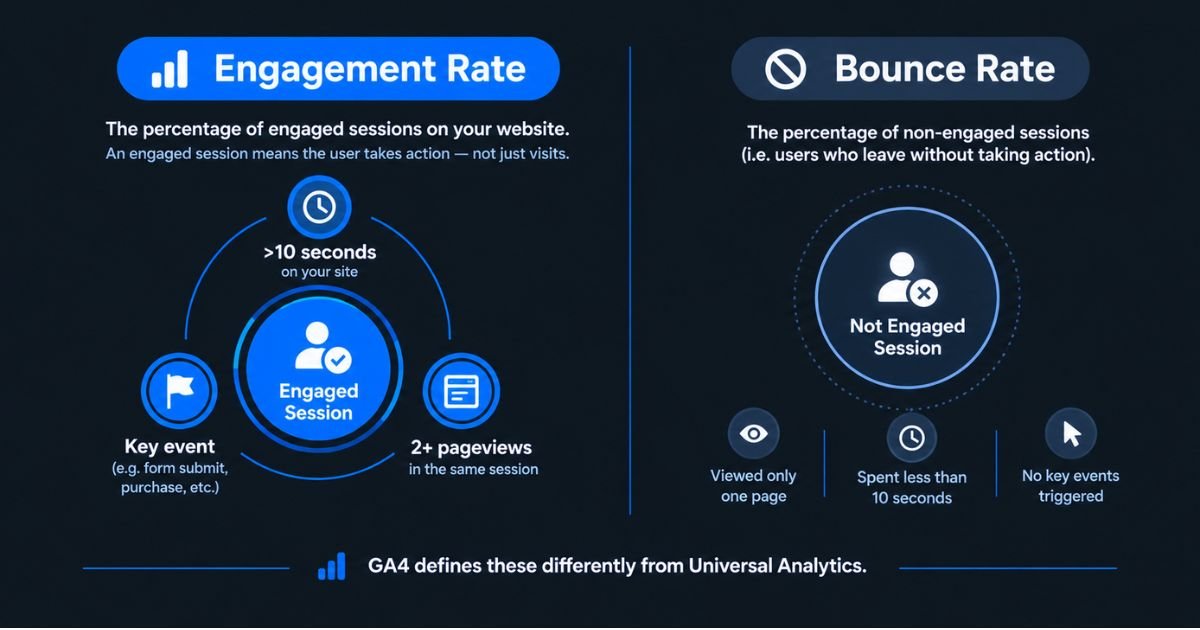
Universal Analytics organized measurement around sessions, pageviews, and different hit types: pageviews, events, and transactions, each with its own structure.
GA4 uses an event-based model. Interactions such as pageviews, clicks, scrolls, form submissions, and purchases can all be recorded as events with a consistent structure.
Important: GA4 still measures sessions. The measurement model is event-based, but sessions remain an important metric in GA4 reporting. This is one of the most commonly misunderstood points in the GA4 transition.
Practical example: a visitor who lands on your service page, scrolls through the content, and submits a contact form may trigger several events in one session: page_view, scroll, and a custom form_submit event. Each of those interactions is measurable independently.
2. Bounce Rate and Engagement Rate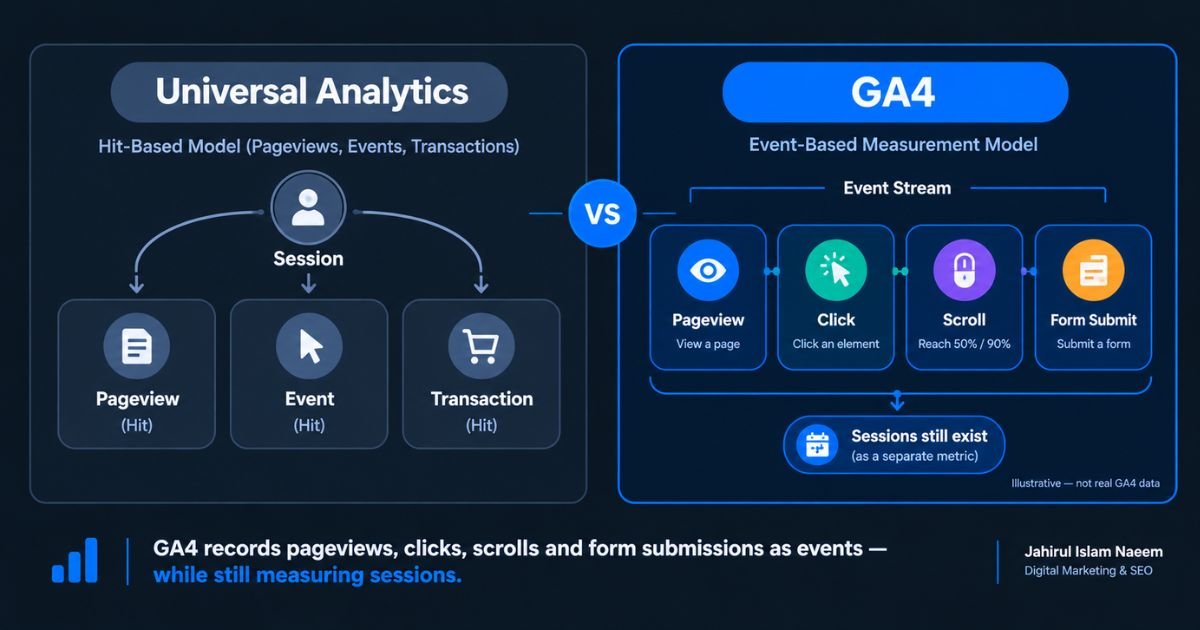
GA4 reports both engagement rate and bounce rate, but the definitions differ from Universal Analytics.
In GA4, an engaged session meets at least one of these conditions:
- The session lasted longer than 10 seconds
- The session included a key event
- The session included at least two pageviews or screenviews
Engagement rate is the percentage of sessions that qualify as engaged. Bounce rate in GA4 is the percentage of sessions that were not engaged the inverse of engagement rate.
Practical takeaway: Do not compare UA and GA4 bounce rates as if they were calculated the same way. The definitions, and therefore the numbers, are genuinely different.
3. Goals, Key Events, and Conversions
Universal Analytics used Goals to measure important actions reaching a confirmation page, completing a specific interaction, or spending a defined amount of time on a page.
GA4 uses an event-based approach throughout. User interactions are recorded as events. Events that are important to a business can be marked as key events in Analytics. When those key events are used for advertising measurement through a Google Ads integration, they can be configured as conversions.
Example: a lead-generation business might track a generate_lead event when a visitor submits an enquiry form. That event can be marked as a key event in GA4 and used as a conversion in Google Ads campaign optimization.
Note: A tracked event is not automatically proof of a successful business outcome. Configure events carefully, test them before relying on the data, and connect analytics measurement to your actual business goals.
4. Reporting Views and Data Streams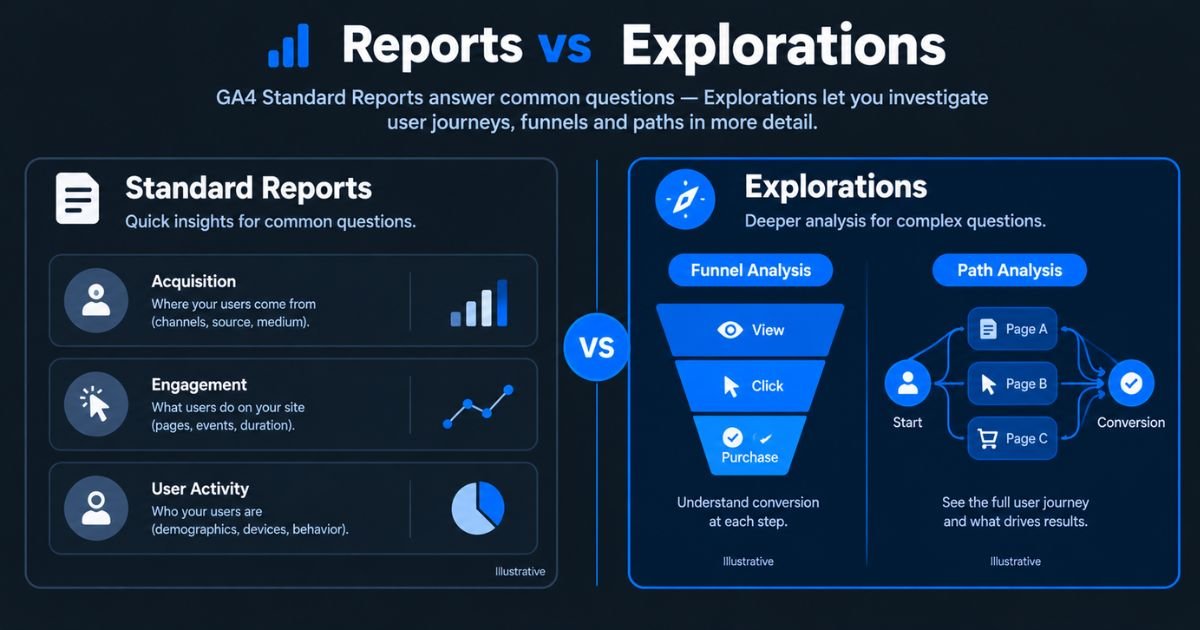
UA properties used reporting views, which could have different settings, filters, and goals applied independently. Many accounts maintained separate views for raw data, filtered data, and test configurations.
GA4 uses data streams to collect data from websites and apps within a property. A stream is a data source, not a reporting filter or a direct functional equivalent of a UA view.
Practical takeaway: Understand the structure of your GA4 property and streams before configuring measurement or attempting to compare historical data. Data streams and UA views serve different purposes.
5. Standard Reports and Explorations
GA4 includes standard reports covering acquisition, engagement, monetization, and user activity. These provide answers to common, recurring analytics questions.
Explorations allow deeper, more customizable analysis. Techniques available in Explorations include funnel analysis, path analysis, segment overlap, cohort analysis, and user exploration.
UA also offered custom reporting options, so this is not a shift from fixed reports to flexible reports. The key difference is how GA4 organizes its standard and exploratory analysis experiences and what is available within Explorations that was not straightforward in UA.
Practical example: if organic search traffic is increasing but contact form submissions are not, you can use Explorations to investigate which landing pages are attracting organic visitors, where users leave the journey, and whether key events are firing correctly.
6. UA View Filters and GA4 Data Filters
UA view filters could modify which data was included in a reporting view by filtering by hostname, subdirectory, traffic source, and more.
GA4 data filters support specific use cases, including excluding internal traffic and developer traffic. They do not replicate the full range of UA view filter functionality.
Important: When a GA4 exclusion data filter is active, it can permanently prevent matching incoming data from being processed. It does not remove previously collected data. Use report filters applied within a report view when you want to narrow what you see without permanently excluding incoming data.
Which Should You Focus on Learning?
Universal Analytics is a legacy platform. GA4 is the current Google Analytics experience.
If you are new to analytics, start with GA4 from the beginning. If you have a UA background, the most useful approach is not to try to reproduce every UA report in GA4 it is to understand what each GA4 metric actually represents and build reports around the questions your business needs to answer.
For SEO and digital marketing, the most valuable skills are: configuring events correctly, understanding how engagement is measured, setting up key events for important actions, using Explorations to investigate user journeys, and connecting analytics data to real marketing decisions.
Frequently Asked Questions
Is GA4 still based on sessions?
GA4 uses an event-based measurement model, but sessions remain an important metric. GA4 records user interactions as events and still groups them into sessions for reporting purposes.
Is GA4 engagement rate the same as bounce rate?
No. Engagement rate is the percentage of sessions that were engaged, lasting more than 10 seconds, including a key event, or containing at least two pageviews. Bounce rate in GA4 is the percentage of sessions that were not engaged. The two are inverse metrics, and both are defined differently from UA's bounce rate.
Did GA4 replace UA Goals with conversions?
GA4 replaced Goals with an event-based approach. Important events can be marked as key events in Analytics. Conversions in GA4 are specifically for advertising measurement through Google Ads integration. The setup and counting rules are not identical to UA Goals.
Are GA4 data streams the same as UA views?
No. Data streams collect website or app data into a GA4 property. UA views served different reporting purposes, applying filters, goals, and settings to produce different views of the same data. These are different structures with different functions.
Can I compare UA and GA4 numbers directly?
Some metrics can be compared cautiously, but definitions, collection methods, attribution models, and property settings can produce genuine differences between UA and GA4 numbers. Do not assume that the same metric name means the same calculation.
About the Author
Jahirul Islam Naeem is a Digital Marketing & SEO Specialist who helps businesses grow through SEO, content strategy, analytics, conversion optimization, and data-driven digital marketing. He regularly writes about business growth, website strategy, and search marketing to help entrepreneurs build websites that generate measurable results.
Need help understanding analytics for your website? Explore my resources or contact me through jahiruldigital.com to discuss your website measurement and marketing needs.